Live technician tracking
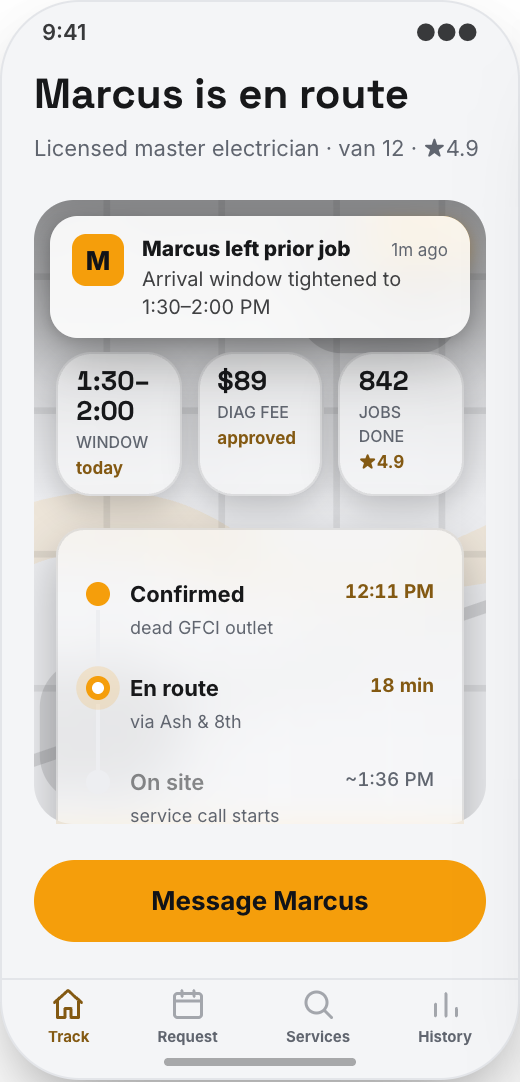
Customers open Track Tech to see when their electrician is on the way, the live ETA, and the job status. Fewer where-are-you calls for the office.
Working prototype · Home services
Explore a working electrician & electrical contractor app prototype with live technician tracking, clear service requests, and photos before the visit. Customize it yourself or have Mistflow Studio build the approved screens, style, and flow.
This is a working mobile prototype, not a shipped app. Mistflow can turn it into a native iPhone and Android app after you confirm the screens, platform details, and integrations.
Built for electrician work
Not a generic app template. This prototype starts with the moments that cost your team time or leave customers waiting.
Inside the prototype
Keep what fits, change what does not, and add the details that make the workflow yours.
Customers open Track Tech to see when their electrician is on the way, the live ETA, and the job status. Fewer where-are-you calls for the office.
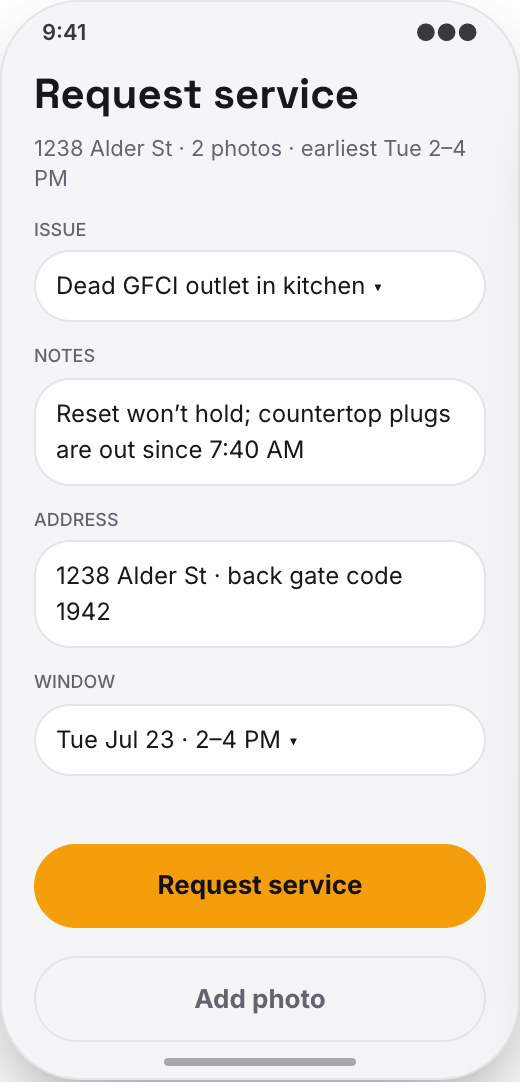
Homeowners use Request Service to choose the problem, like outlet not working, switch issue, flickering light, breaker tripping, or no power in one room, then describe what is happening before you arrive.
Customers can attach photos of the outlet, panel, light fixture, or breaker label so your team shows up with a better idea of the job.
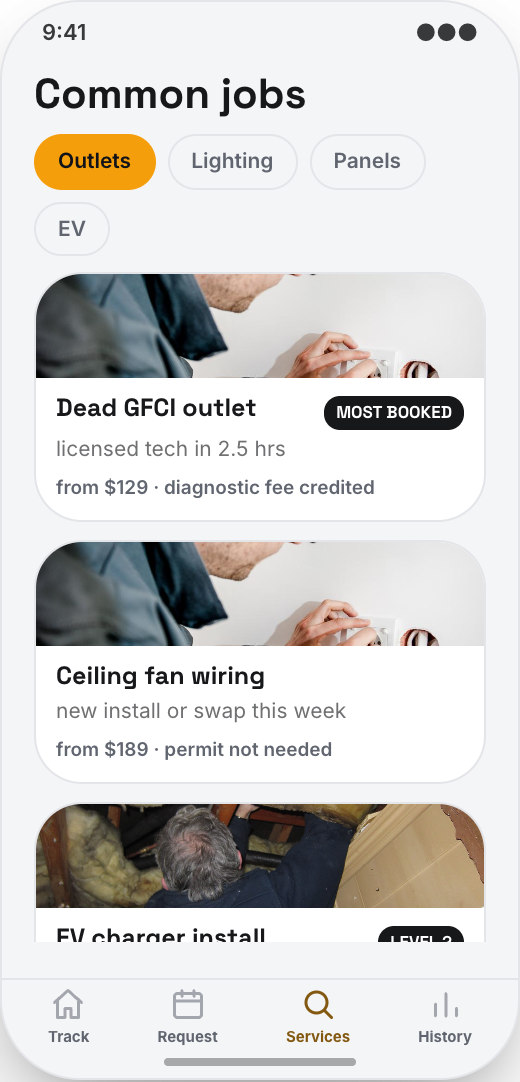
Common Jobs shows everyday work like ceiling fan installs, GFCI replacement, EV chargers, panel upgrades, surge protection, and dedicated circuits with starting prices so customers can book confidently.
Mark a visit as requested, scheduled, on the way, working, or complete. The customer sees the update in the app instead of calling the office.
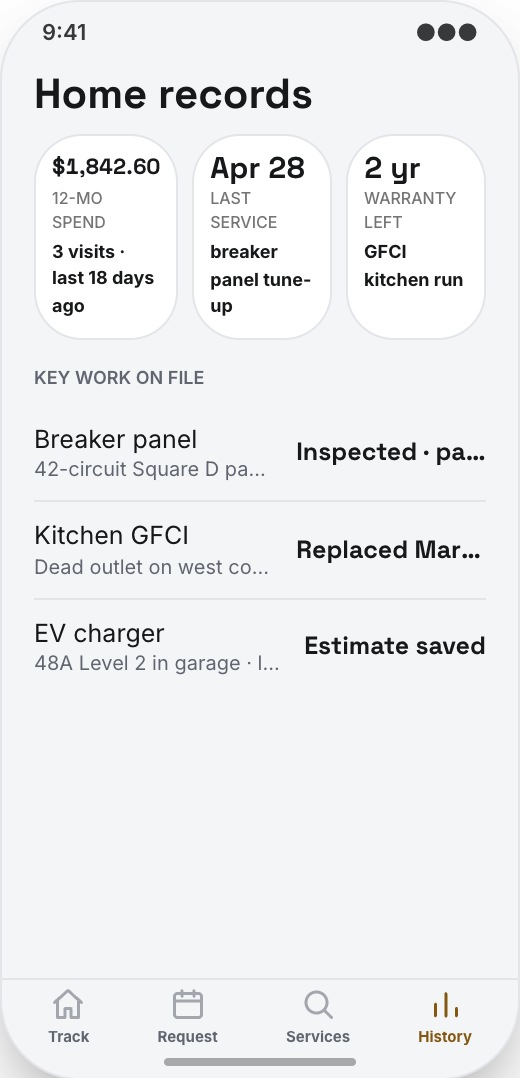
Home Records keeps past visits, what was fixed, invoice copies, notes about the panel, and previous service history in one place for the homeowner.
A customer can look at last year's ceiling fan install or outlet repair and request more work without explaining their whole house again.
Prototype screen gallery
These are screens from the working prototype—not screenshots of a shipped customer app.
Example workflows
Use these examples to judge whether the flow matches your business before you commit to building it.
The build promise
Explore this working prototype, customize it yourself or hand it to us, then approve the screens, style, and flow before the finished build begins.
Try the proposed flow and review every prototype screen.
Change the words, branding, features, and workflow until it fits.
Your approved prototype becomes the clear visual contract for the finished app.
Straight answers
Choose self-serve if you want control, or Studio if you want Mistflow to take the build from approved prototype to a native iPhone and Android app.
Agency comparison from the industry brief: A custom electrician app from an agency can run $20,000 to $70,000, especially if you want customer booking, technician ETA, job status, invoices, and service history. Quotes vary by scope, platform, and integrations.
Start from this exact prototype, make it yours, and build in Mistflow. See the pricing page for current subscription options.
Build my versionHand the approved prototype to the Mistflow team for a focused native mobile app build. Scope is confirmed before the 14-day engagement starts.
Have Mistflow build itBuying questions
Clear answers about the prototype, the finished build, and your two paths forward.
No. The screens on this page are a working prototype: you can explore the flow, but it is not a shipped customer app. The finished app is built after you approve or customize the prototype.
Yes. Build my version carries this exact prototype into Mistflow, including its screens, style, and flow. You can change it before the finished app is built.
You can change the branding, wording, steps, and features. This prototype currently demonstrates Live technician tracking, Clear service requests, and Photos before the visit, and you can keep, remove, or reshape those parts around the way your business works.
Yes. In the finished app, the Track Tech screen is built for that exact moment. Customers can see when the technician is on the way, the live ETA, and the current job status.
Yes. In the finished app, home Records lets customers review what was fixed, keep invoice copies, and see service history for their home so rebooking is easier.
For self-serve, you use a Mistflow subscription; current plan prices are listed on the pricing page. Mistflow Studio is a separate $4,900 fixed service for a 14-day native iPhone and Android app build. Scope is confirmed before work starts.
Related prototypes
Compare adjacent workflows and borrow the ideas that fit your business.
Start from the working prototype you just reviewed. Customize it yourself or hand the approved direction to Mistflow Studio.
Prototype preview only. The finished app is built after you approve the direction.